Agency Subscription
The Subscription tab shows which plan your agency is on, how many member seats are in use, when the current term ends, and what billing looks like. It is for Agency Admins. Members who are not Agency Admins do not see the tab.
To open it: Agency (left menu) → Subscription on the top bar.
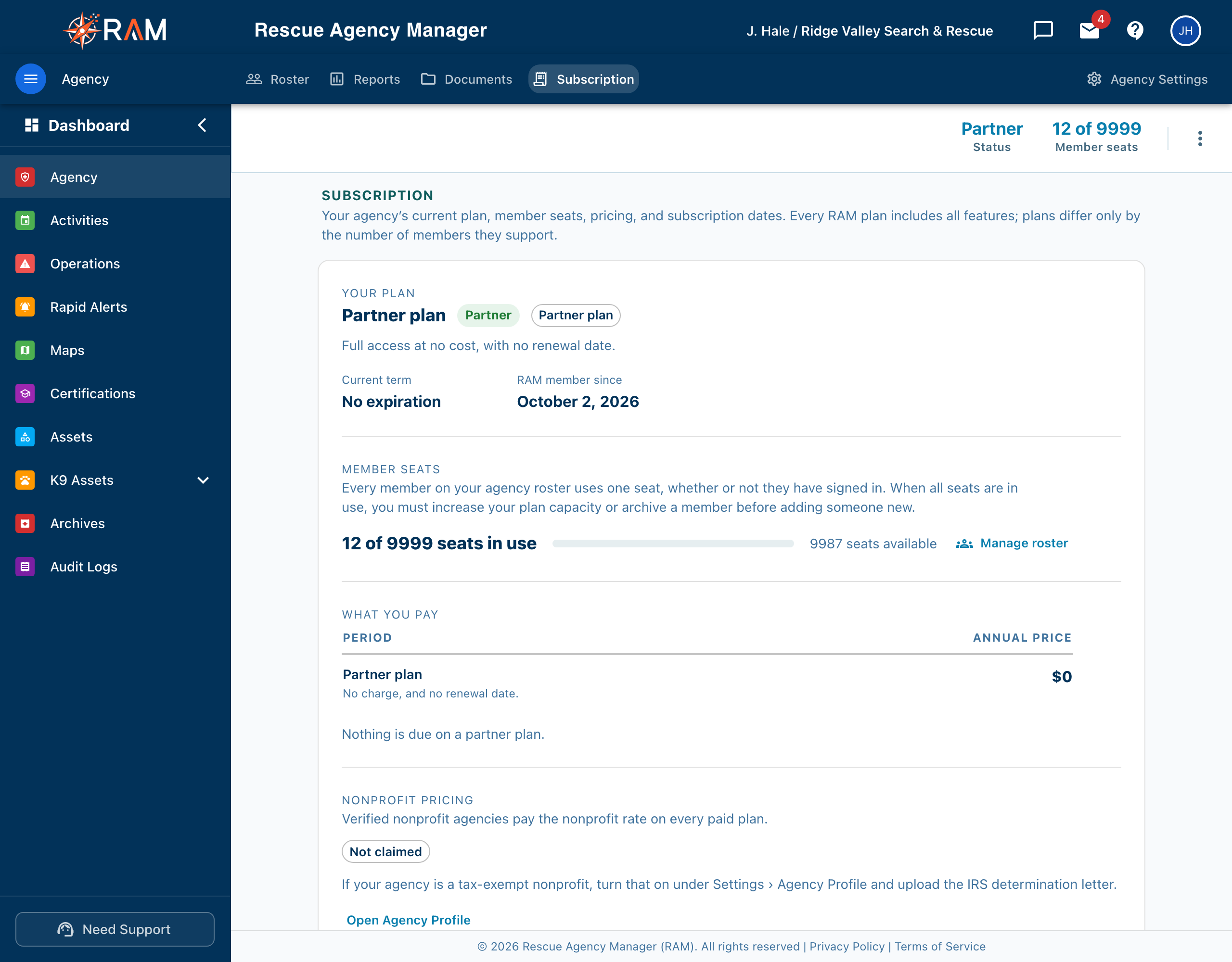
This page does not list prices. For current plans and prices, see the pricing page at rescueagencymanager.com/pricing. The tab shows your own figures and dates.
Plans differ by the number of members they support, not by features. A few modules, such as Animal Management and Rapid Emergency Alerting, are different: RAM switches them on for an agency on request, and they appear in the menu only when on. See Add-on modules.
Table of Contents
- The bar at the top
- Your plan
- Member seats
- What you pay
- Nonprofit pricing
- Billing
- When access is limited
- Add-on modules
The bar at the top
| Item | What it shows |
|---|---|
| Status | Active, Trial, Grace period, Expired, or Partner |
| Member seats | Members on your roster against the seats your plan includes, for example 18 of 25 |
| Days remaining | Days left in the current term, beta period, or trial. Shown when the plan has an end date. It turns to a warning in the last 14 days. |
| Manage billing | Opens the secure Stripe billing portal. Shown on paid plans. |
| Change plan or View plan options | Opens the plans page where you pick a plan. Change plan on a paid plan; View plan options otherwise. |
Change plan and View plan options do not appear for a Partner plan or a custom plan. Those are set up with RAM directly.
Your plan
This section names the plan and says how it is provided.
| Plan type | What it means |
|---|---|
| Free trial | No charge during the trial. Choose a plan before it ends to keep access. |
| Beta program | No charge for your agency, through the date shown or with no end date. |
| Paid subscription | Billed through Stripe. The card and invoices are under Manage billing. It renews automatically on the date shown. |
| Free plan | No charge on this plan. |
| Partner plan | Full access at no cost, with no renewal date. |
| Granted plan | Provided directly by RAM rather than purchased. There is no card on file and no invoice. |
You also see the term dates, a progress bar through the term, the renewal date and billing schedule on a paid plan (billed annually or monthly), and the date your agency became a RAM member.
After the beta or trial
On a beta or trial plan with an end date, an After the beta or After the trial section tells you what happens next:
- Your agency will not be charged automatically when the beta or trial ends. To keep using RAM, an administrator must choose a paid plan and add a payment method.
- It says how your plan is picked, which is based on the number of members on your roster, and shows any discount or special offer made to your agency, with how long it lasts.
Member seats
Every member on your agency roster uses one seat, whether or not they have signed in. The section shows seats in use, a bar, and how many seats are left. The bar turns amber with 3 or fewer left and red when none are.
When all seats are used, you must increase your plan or archive a member before you can add someone new. Archiving a member frees their seat. Manage roster opens the Roster. See Team Management.
What you pay
A small table shows:
- What the agency pays today (for a free, beta, trial, partner, or granted plan this is $0, with a note that nothing is billed and there is no payment method on file).
- On a plan that is not yet paid, the price that would apply on a paid plan, based on your member count, and a Pricing details link to the plans page.
- A verified nonprofit price line, labeled an estimate until RAM verifies your status.
If your agency has more members than the largest published plan, the price is shown as Quoted, meaning RAM quotes it to you directly.
Paid plans renew automatically each term. Sales tax is worked out at checkout and shown on each invoice.
Nonprofit pricing
Verified nonprofit agencies pay the nonprofit rate on every paid plan. The status shows as:
| Badge | Meaning |
|---|---|
| Nonprofit status verified | Your agency qualifies. |
| Pending review | RAM is reviewing your tax-exempt status, usually within 1–2 business days. Until then the page shows standard pricing. |
| Not claimed | To claim it, turn on tax-exempt status under Agency Profile and upload your IRS determination letter. |
A button on this section opens the Agency Profile. See Agency Profile.
Billing
- On a paid plan, payments go through Stripe. Manage billing opens your Stripe portal, where you can change the payment method, download invoices, or cancel.
- On a free, beta, trial, partner, or granted plan, there is nothing to bill, so there is no payment method and no billing history.
When access is limited
| Banner | What it means | What to do |
|---|---|---|
| The subscription has expired and RAM is read-only. | RAM is read-only until a plan is chosen. | Choose a plan on the plans page to restore full access. |
| Payment is overdue. | Access continues for a short grace period. | Update the card under Manage billing. |
Add-on modules
This tab does not offer add-on modules to buy, and plans do not change which features you have. Some modules are switched on per agency by RAM, for example Animal Management, Rapid Emergency Alerting, and Live Operations. To use one, contact RAM support and ask for it. Until it is on, its menu items and settings do not appear.
Related Pages
- Agency Settings
- Team Management: adding and archiving members
- Agency Profile: nonprofit status
- Agency Documents
- Agency Reports